Analysis It is just over a year since Microsoft
announced the open sourcing of
.NET Core, a cross-platform fork of the Windows-only .NET Framework.
The .NET Framework is not going away, but it is now apparent that the company's focus is on .NET Core as the future of its development platform. Microsoft's .NET Framework goes back a long way, first announced at the company's TechEd Europe in 2000.
At the time it was seen as a defensive move against Sun's Java, which threatened Windows thanks to its cross-platform capability combined with a programming language that was easier and more productive than C or C++.
Microsoft's C#, the primary .NET language, did not see off Java, but proved popular for developing business applications.
The company also evolved the language more rapidly than Sun was able to do with Java, showing what a capable internal team could achieve versus a more bureaucratic community-driven process.
ASP.NET, co-invented by Microsoft's Scott Guthrie, was a big advance on the old ASP (Active Server Pages) as a framework for web applications.
Why then did Microsoft decide to fork the .NET Framework, with all the risks and confusion that entails, and embrace open source and cross-platform? There are several reasons.
The first is that the .NET Framework was monolithic and its internal dependencies too convoluted for Microsoft to move forward with certain projects. In particular, the company wanted to compile .NET to true native code, without needing a runtime installed.
Benefits include faster start-up, faster performance in some scenarios, but above all cleaner and simpler deployment. If applications depend on an operating system runtime, then there is always a risk that updating the operating system could break the application.
The compatibility burden also tends to slow down development of the runtime.
Microsoft's solution was to refactor the .NET Framework into a new, more modular system, while still maintaining the existing version for compatibility. This new version is .NET Core.
It was first used for Windows 8 Store apps, which is why the .NET Native project initially targeted only Store apps, now evolved into Universal Windows Platform (UWP) apps for Windows 10.
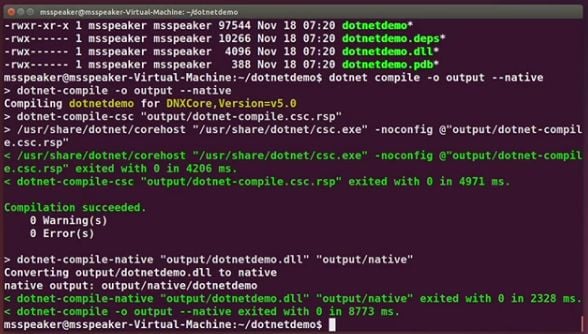
At the Connect event in New York this week, Microsoft showed the next stage for .NET Native: targeting .NET Core on Linux, Mac and Windows. There was a demonstration of .NET Core compiled to native code on Ubuntu, though this feature is not yet in the public release.
Whether or not .NET Native is used, freeing .NET applications from an operating system runtime fits better with today's development trends, for containerised applications and microservices, distributed applications built from components that can be maintained and updated separately.
The cut-down Nano Server version of Windows Server runs .NET Core but not the .NET Framework; again it is all part of the move towards containerisation and DevOps, automated and continuous delivery of applications.
Note that, UWP apps aside, .NET Core is for server applications, not desktop apps with a GUI. Microsoft is not porting frameworks such as Windows Forms or Windows Presentation Foundation to .NET Core. It is open source though, so it is always possible that the community may come up with GUI frameworks.
There is also a relationship between .NET Core and Mono, the independent open-source .NET implementation founded by Miguel de Icaza back in 2001. Mono does support desktop applications. Now de Icaza is on the board of directors for the
.NET Foundation, set up to oversee .NET Core. Speaking at the 2015 dotnetConf event in March 2015, de Icaza said that Mono may eventually be just a runtime core, borrowing both the "Roslyn" compiler and the CoreFx foundation libraries from .NET Core.
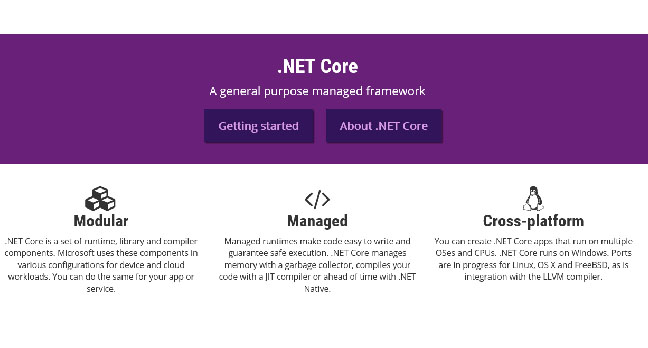
.NET Core, Microsoft's fork of the .NET Framework for cross-platform and open source
The next question then: why cross-platform and open source? It turns out that these two questions are related. At dotnetConf, Program Manager Immo Landwerth described open source as the "most sustainable way to build a cross-platform stack." The reason given for going cross-platform is to attract new customers to .NET and build a stronger ecosystem, such as third-party libraries and applications that run on .NET.
There are obvious risks for the company in both cross-platform and open source. Microsoft is giving away intellectual property as well as enabling customers to run .NET applications on non-Windows systems, with no revenue from licences.
Internally to Microsoft, the business case for .NET Core always has to be made. Chatting to .NET Foundation folk I get the impression that this is all about Azure, Microsoft's cloud platform. Azure supports Linux as well as Windows, and if you deploy to Azure, Microsoft gets your money whatever operating system you use.
A recently announced
partnership with Red Hat would not have been possible without this open source, cross-platform strategy. Red Hat Enterprise Linux is now supported on Azure, and the "reference operating system for .NET Core on Linux", according to the press release.
Another factor is that through .NET Core Microsoft hopes to stimulate use of its languages, including C# and F#, a functional programming language. If you code in these languages, Microsoft has a ton of libraries that will pull you towards SharePoint or Office 365, for example, so that the company can profit from licences or subscriptions there.
How serious is Microsoft about .NET Core?
How serious is Microsoft about .NET Core? As far as one can tell, very serious – of course, it was very serious about the now-abandoned Silverlight browser plugin a few years back, so these things can change. At dotnetConf, Program Manager Richard Lander said that 100-200 people work on .NET Core, excluding related teams such as those for Visual Studio and ASP.NET. It is a "very sizeable investment", he said.
Another clue came from Microsoft's Martin Woodward, the Executive Director of the .NET Foundation and (he said) its only full-time staff member was present. He spoke at the recent Future Decoded event in London, and was available at the exhibition there. Talking about the relationship between .NET Framework and .NET Core, he said that "new feature work mostly happens in .NET Core now," and that code is then pulled into the .NET Framework in order to add support there.
At Connect, Microsoft announced that .NET Core is now at Release Candidate stage, complete with a "go-live" licence so that production applications are supported. Should you jump?
Probably not yet. A snag with .NET Core is that it's cut-down relative to the full .NET Framework, and existing applications are unlikely to run without considerable work. ".NET Core v1 is unusable for many apps,"
said developer Frans Bouma on Twitter. If your application uses a DataTable, for example, part of the ADO.NET library, it will not work in .NET Core as it has not been ported.
Microsoft has ported its Entity Framework Object-Relational database library to .NET Core, but some developers avoid this for performance reasons. Entity Framework 7 (EF7) RC1 has recently been released, and in the
announcement Microsoft's Rowan Miller notes that "because of the fundamental changes in EF7 we do not recommend attempting to move an EF6.x application to EF7 at this stage".
EF7 is also slower than EF6 in this release, though Miller said that it will be faster by the time it is fully released.
Entity Framework 7 performance versus the previous version. The red line shows that EF7 is slower in RC1.
There is a huge existing ecosystem built on the .NET Framework, and porting these to .NET Core is not trivial. Given that the .NET Framework is still there, it is not certain that developers will want to invest the time and energy in migrating.
How is performance for .NET Core versus .NET Framework overall? The official line is that it is similar, though with .NET Core is optimised for concurrency and should perform better in some scenarios, just as the mature .NET Framework will do better in others.
Despite some difficult issues, this is a bold initiative from Microsoft and one that fits neatly with DevOps and cloud computing. It is also clear that the company sees this as the future of the .NET platform – note that it is for the UWP as well as server applications – so those working with .NET should pay attention, even if it is too early to use for actual work.
Source: http://www.theregister.co.uk